Cysic NFT Attach & Detach Tutorial
Overview
Cysic NFT holders can attach their NFTs to a worker address to earn a staking multiplier bonus on CYS rewards. When you no longer wish to bond your NFT to a specific worker, you can detach it and re-attach it elsewhere.This guide walks you through both processes step by step.
Key Concepts
- Attach: Bond your NFT to a worker address. This applies a reward multiplier based on the NFT tier and quantity attached.
- Detach: Unbond your NFT from a worker address. The NFT returns to your available balance and can be re-attached to a different worker.
- Multiplier: Each NFT tier provides a different reward multiplier. Higher-tier NFTs yield a higher multiplier percentage. The maximum multiplier per worker address is 100%.
- Worker Address: The on-chain address of the Cysic prover/worker node you want to bond your NFT with.
NFT Tiers & Multipliers
| Tier | Name | Multiplier per NFT |
|---|---|---|
| Tier 1 | Tesseract | 20% |
| Tier 2 | Monolith | 15% |
| Tier 3 | Allspark | 10% |
| Tier 4 | MotherBox | 5% |
Note: The maximum multiplier for a single worker address is 100%. You cannot exceed this cap regardless of how many NFTs you attach.
The current NFT multiplier bonus is effective for 6 months, until Aug 11, 2026.
Supported Chains
NFT attach/detach is supported on both BNB Chain and Base Chain. Make sure your wallet is connected to the correct network before proceeding.
Prerequisites
Before you begin, ensure you have:
- A Web3 wallet (e.g., MetaMask) connected to the Cysic platform at https://cysicfoundation.org/userPortal.
- At least one Cysic NFT in your wallet.
- The worker address you want to bond with (for attach operations).
Part 1: How to Attach an NFT
Step 1 — Navigate to the MY NFTs Page
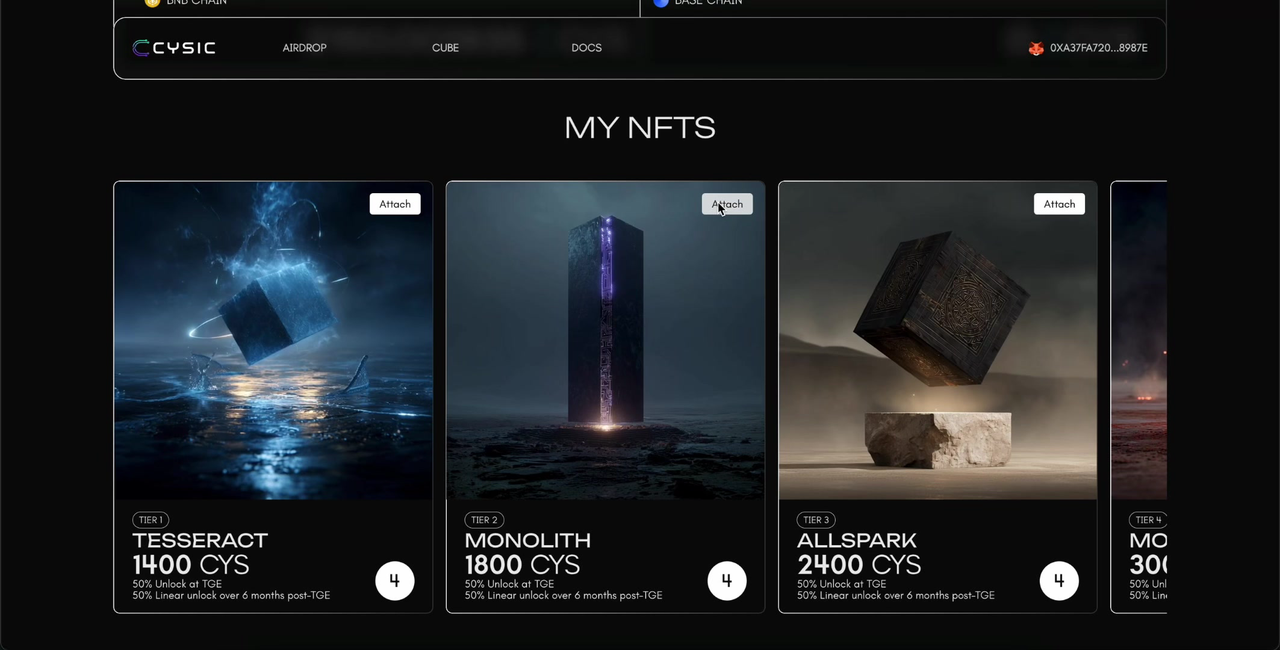
Go to https://cysicfoundation.org/userPortal and locate the MY NFTS section. You will see all your NFTs displayed as cards, organized by tier. Each card shows the NFT name, tier, and the number of NFTs you hold (shown in the bottom-right circle).Click the Attach button on any NFT card to begin.
Step 2 — Select the NFT Tier
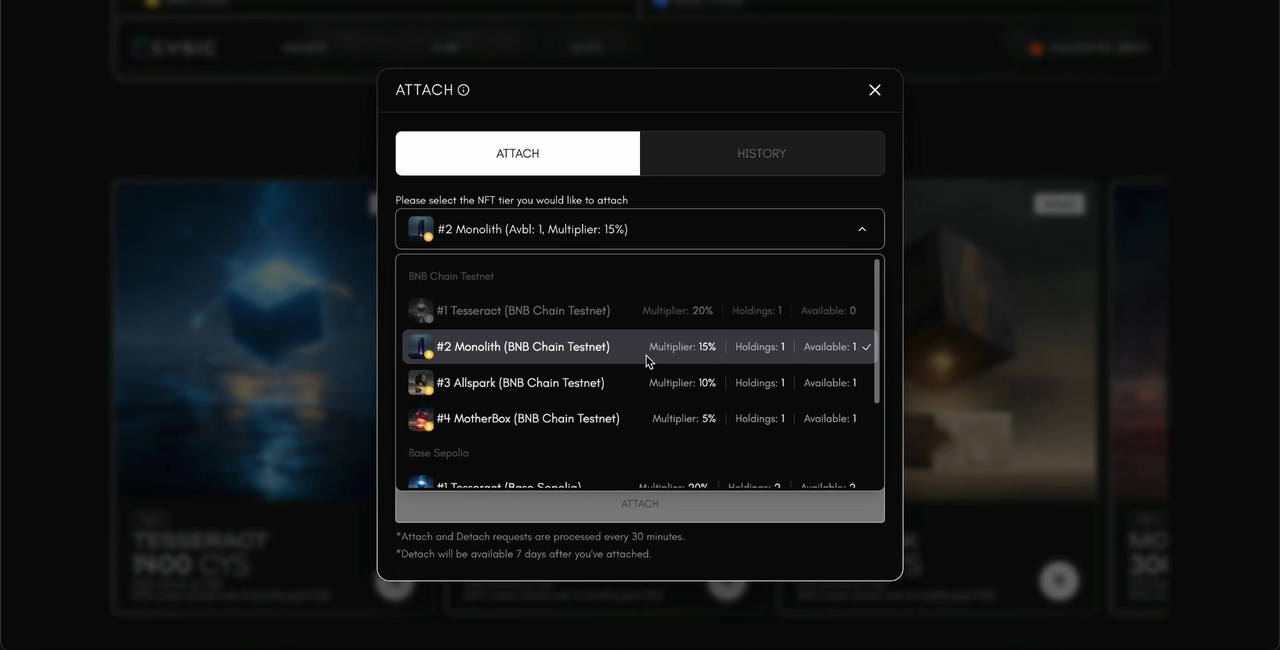
An ATTACH dialog will appear. Click the dropdown to select the NFT tier you would like to attach.The dropdown lists all your NFTs across supported chains (BNB Chain and Base Chain), showing:
- Multiplier: The reward bonus percentage for that tier.
- Holdings: Total number of that NFT tier you own.
- Available: Number of NFTs currently unattached and available for bonding.
Note: If "Available" is 0, all NFTs of that tier are already attached. You must detach one first before re-attaching.
Step 3 — Fill in the Attach Form
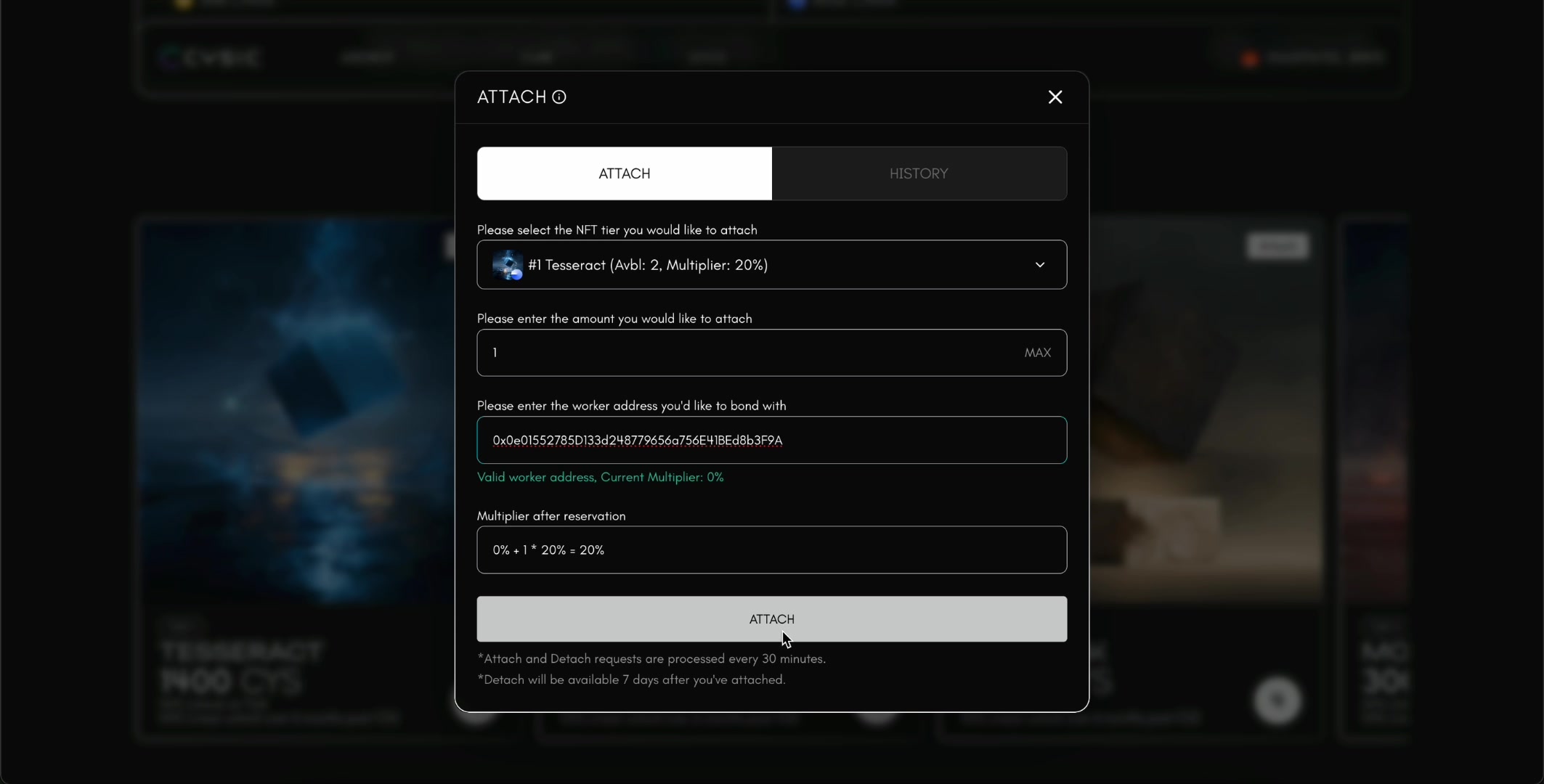
After selecting a tier, the form will display three input fields:
- Amount: Enter the number of NFTs you want to attach. You can click MAX to attach all available NFTs of the selected tier.
- Worker Address: Paste the worker address you want to bond with. This is the on-chain address of the Cysic prover node.
- Multiplier after reservation (auto-calculated): Once you enter a valid worker address, the system will:
- Validate the address and display a green confirmation: "Valid worker address, Current Multiplier: X%"
- Calculate and display the new multiplier using the formula:
Current Multiplier + Amount × Tier Multiplier = New Multiplier - For example, attaching 2× Tier 1 Tesseract NFTs (20% each) to a worker with 0% current multiplier:
0% + 2 × 20% = 40%
Important: The maximum multiplier per worker address is 100%. If your calculation exceeds 100%, you will need to reduce the number of NFTs or choose a lower-tier NFT.
Step 4 — Submit and Confirm in Wallet
Once all fields are filled and the multiplier is calculated, the ATTACH button will become active (highlighted white). Click it to submit.Your wallet will prompt a Signature Request. Review the details and click Confirm to sign the transaction.
Step 5 — Wait for Confirmation
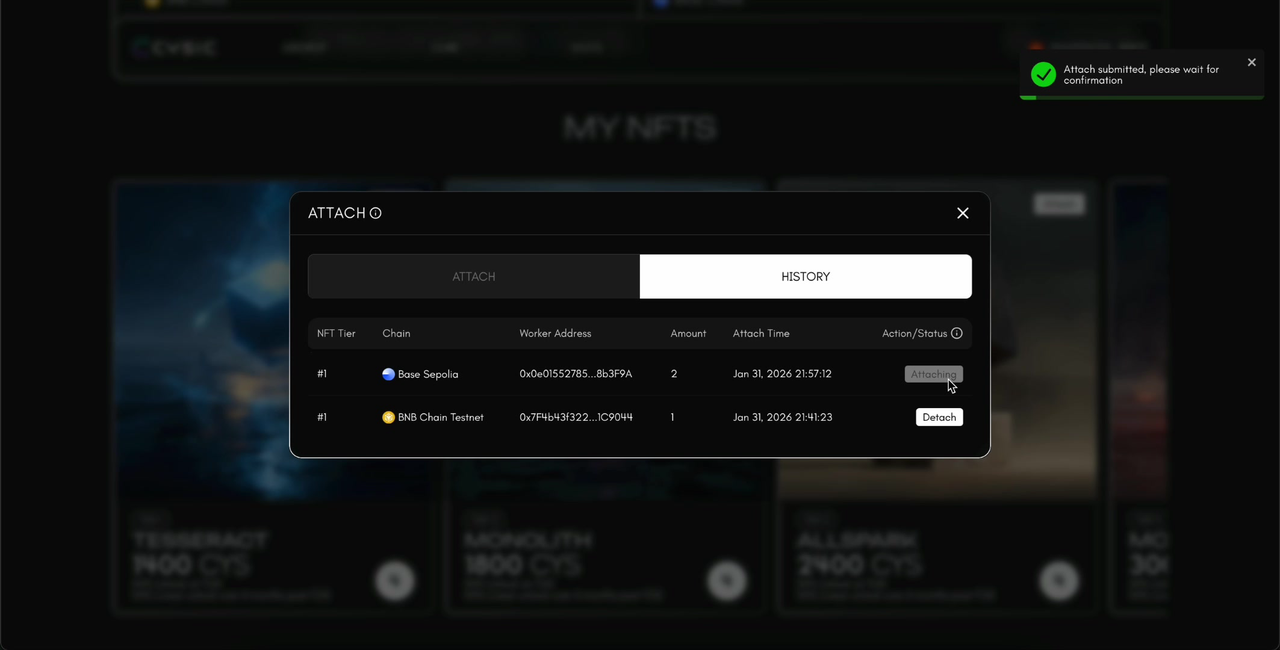
After signing, you will see a green success notification:
"Attach submitted, please wait for confirmation"
The system processes attach and detach requests every 30 minutes. Your request will be queued and processed in the next batch. The multiplier bonus will not take effect immediately — it will become active within 30 minutes after the request is processed.
Step 6 — Verify in History
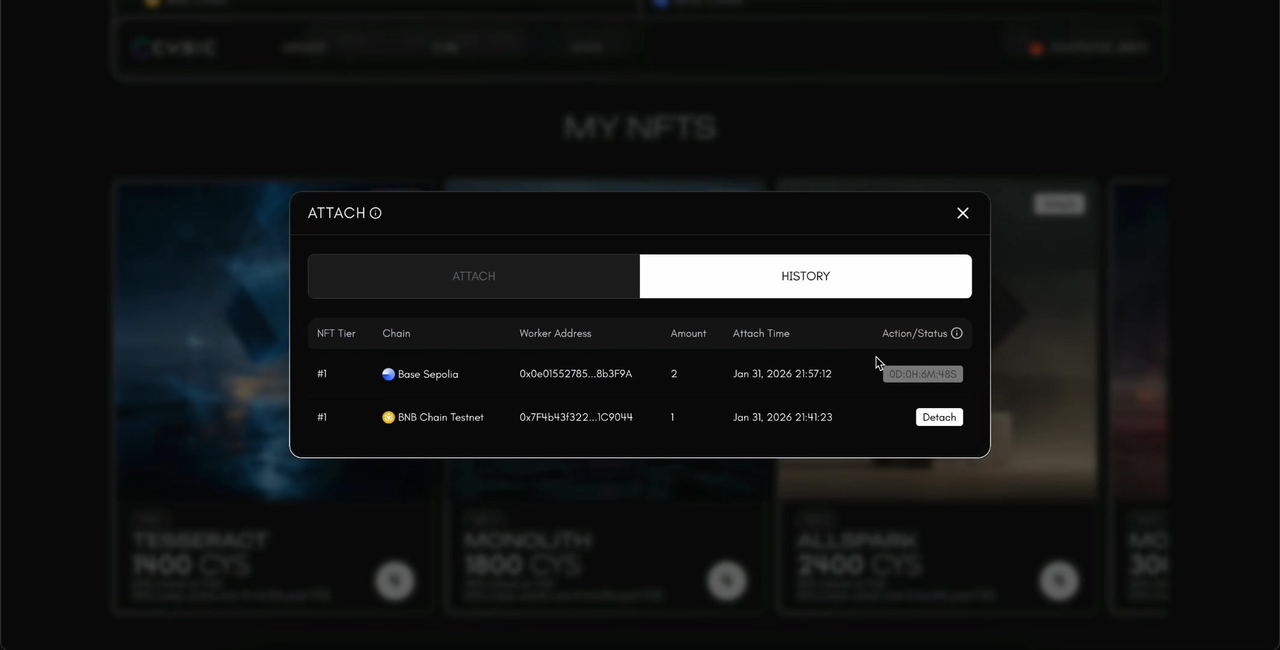
Switch to the HISTORY tab to verify your submission. You will see a table with the following columns:
| Column | Description |
|---|---|
| NFT Tier | The tier number of the attached NFT |
| Chain | Which blockchain the NFT is on (BNB Chain / Base Chain) |
| Worker Address | The worker address the NFT is bonded to |
| Amount | Number of NFTs attached |
| Attach Time | Timestamp of the attach request |
| Action/Status | Current status of the request |
Possible statuses:
- Attaching — Request is pending and waiting to be processed (processed every 30 minutes).
- Countdown timer (e.g.,
0D:6H:30M:15S) — The NFT is attached but still within the 7-day lock period. Detach will become available when the timer reaches zero. - Detach (button) — The 7-day lock period has expired. You can now click this button to detach the NFT.
Part 2: How to Detach an NFT
Important: 7-Day Lock Period
After attaching an NFT, there is a mandatory 7-day lock period before you can detach it. During this period, the History tab will display a countdown timer instead of the Detach button. Plan your staking strategy accordingly.
Step 1 — Open the Attach Dialog and Go to History
Click the Attach button on any NFT card to open the dialog, then switch to the HISTORY tab.You will see all your current and past attached records. Look for entries where the Action/Status column shows a Detach button — this means the 7-day lock period has expired and the NFT is eligible for detachment.
Step 2 — Click Detach and Confirm in Wallet
Click the Detach button next to the entry you want to unbond.Your wallet will prompt a Signature Request. Review and click Confirm to sign.
Step 3 — Wait for Confirmation
After signing, a green success notification will appear:
"Detach submitted, please wait for confirmation"
Like attach requests, detach requests are also processed every 30 minutes.
Step 4 — Verify Detachment
Once processed, the status in the History tab will update to Detached. The NFT is now unbound from the worker address and returns to your available balance, ready to be attached to a different worker if desired.
Part3: How to Check Your Multiplier
After attaching NFTs to a worker address, you can verify that the multiplier has been applied correctly by checking the worker details on the Cysic dashboard.
Step 1 — Go to the Dashboard
Navigate to the appropriate dashboard based on your worker type:
Step 2 — Search for Your Worker Address
Use the search function on the dashboard to look up your worker address.
Step 3 — View Multiplier in Details
Click on your worker to open the detail view. The current Multiplier value will be displayed, reflecting the total bonus from all NFTs attached to this worker address.
Note: Remember that the multiplier takes effect within 30 minutes after your attach request is processed. If you just submitted an attach request, wait for the next processing cycle before checking.
Important Notes
- Processing time: Both attach and detach requests are processed in batches every 30 minutes. Your request may not take effect immediately.
- Multiplier activation delay: After your attach request is processed, the multiplier bonus will become active within 30 minutes. It does not take effect instantly.
- 7-day lock period: After attaching, you must wait 7 days before you can detach. Plan your staking strategy accordingly.
- Maximum multiplier cap: A single worker address can have a maximum multiplier of 100%. Any attachment that would exceed this cap will not be allowed.
- Multiplier stacking: You can attach multiple NFTs (even of different tiers) to the same worker address. The multipliers stack additively, up to the 100% cap. For example, attaching 1× Tesseract (20%) and 1× Monolith (15%) gives a total multiplier of 35%.
- Cross-chain support: NFTs on both BNB Chain and Base Chain can be attached to worker addresses. The chain of your NFT is displayed in the History tab.
- Worker address validation: The system automatically validates the worker address you enter. Only valid worker addresses will be accepted. The current multiplier on that worker is also displayed for reference.
- NFT availability: Once an NFT is attached, it becomes unavailable for transfer or further attachment until detached. The "Available" count in the tier dropdown reflects only unattached NFTs.
FAQ
Q: Can I attach NFTs from different chains to the same worker? A: Yes. You can attach NFTs from both BNB Chain and Base Chain to the same worker address. Each attachment is tracked separately in the History tab.
Q: What happens to my multiplier when I detach? A: Your worker's multiplier will decrease by the amount contributed by the detached NFT(s). For example, if your worker has a 40% multiplier from 2× Tesseract NFTs and you detach one, the multiplier drops to 20%.
Q: Can I change the worker address without detaching? A: No. You must first detach the NFT from the current worker (after the 7-day lock period), and then attach it to a new worker address.Q: What if my attach/detach request is still showing "Attaching" or processing? A: Requests are processed every 30 minutes. Please wait for the next processing cycle. If the status does not update after an extended period, try refreshing the page or contact Cysic support.
Q: What is the maximum multiplier I can achieve on one worker? A: The maximum multiplier per worker address is 100%. For example, you could achieve this with 5× Tesseract NFTs (5 × 20% = 100%) or any combination of tiers that adds up to 100%.
Q: Does the multiplier take effect immediately after attaching? A: No. After your attach request is processed, the multiplier bonus will become active within 30 minutes. Both the request processing and the multiplier activation involve a short delay.
Q: Does the NFT multiplier affect my token linear unlock schedule? A: No. The NFT multiplier only affects your reward bonus. It has no impact on the linear unlock schedule of your CYS tokens — they will continue to unlock according to the original vesting terms regardless of whether you attach or detach NFTs.